Reactive Architecture in Flutter: Mastering BLoC for Scalable State Management

When building scalable mobile applications, the ease of Flutter’s setState is a siren song. It works beautifully for a counter app or a simple toggle, but as your application grows into an enterprise-grade solution, coupling business logic tightly with UI widgets creates a codebase that is impossible to test, difficult to refactor, and prone to regression bugs.
To build robust Flutter applications, we must move beyond imperative state manipulation and embrace Reactive Architecture.
In this deep dive, we are going to deconstruct the Business Logic Component (BLoC) pattern. We aren’t just looking at how to use the library; we are examining the architectural principles of separating presentation from logic using Dart Streams, enforcing immutability with freezed, handling complex side effects, and proving correctness through isolated unit testing.
The Imperative vs. Reactive Paradigm
In imperative programming, you tell the computer how to change the state (e.g., “Change the text variable to ‘Loading’ and redraw”). In reactive programming, you define streams of data. The UI becomes a passive view that simply reacts to the current state of the stream.
The BLoC pattern, created by Google, relies on this concept of Unidirectional Data Flow (UDF).
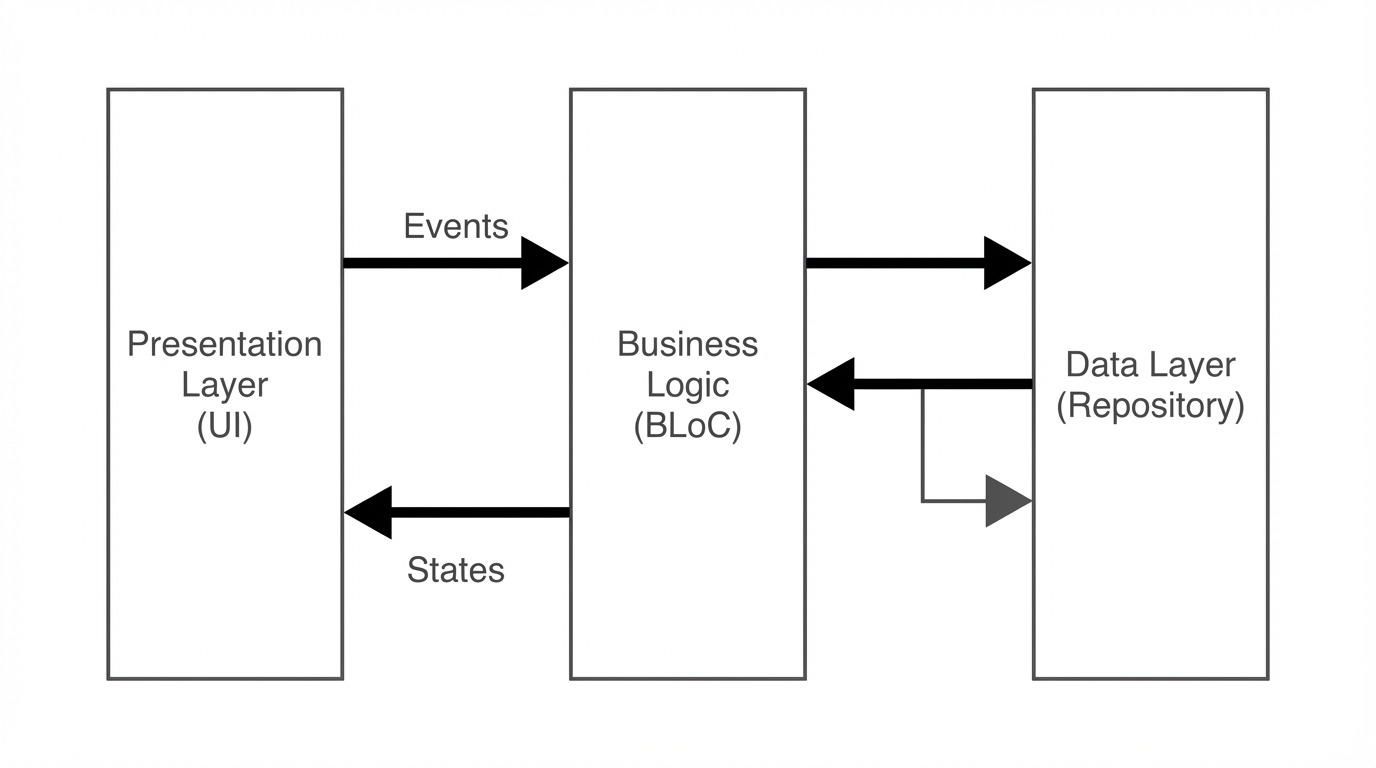
- Events (Input): The UI captures user interactions (taps, inputs) and adds an
Eventto the sink. - BLoC (Processor): The component receives the event, communicates with repositories/services, executes business logic, and emits a new
State. - States (Output): The UI listens to the state stream and redraws itself based on the data received.
This strict separation means your UI knows nothing about how data is fetched, and your Logic knows nothing about how data is rendered. This is the holy grail of clean architecture.
The Reactive Core: Streams, Sinks, and Transformers
At the heart of BLoC is the Dart Stream. If you are coming from a purely imperative background, think of a Stream as an asynchronous pipe. Data enters one end (via a StreamController or Sink) and exits the other end where listeners react to it.
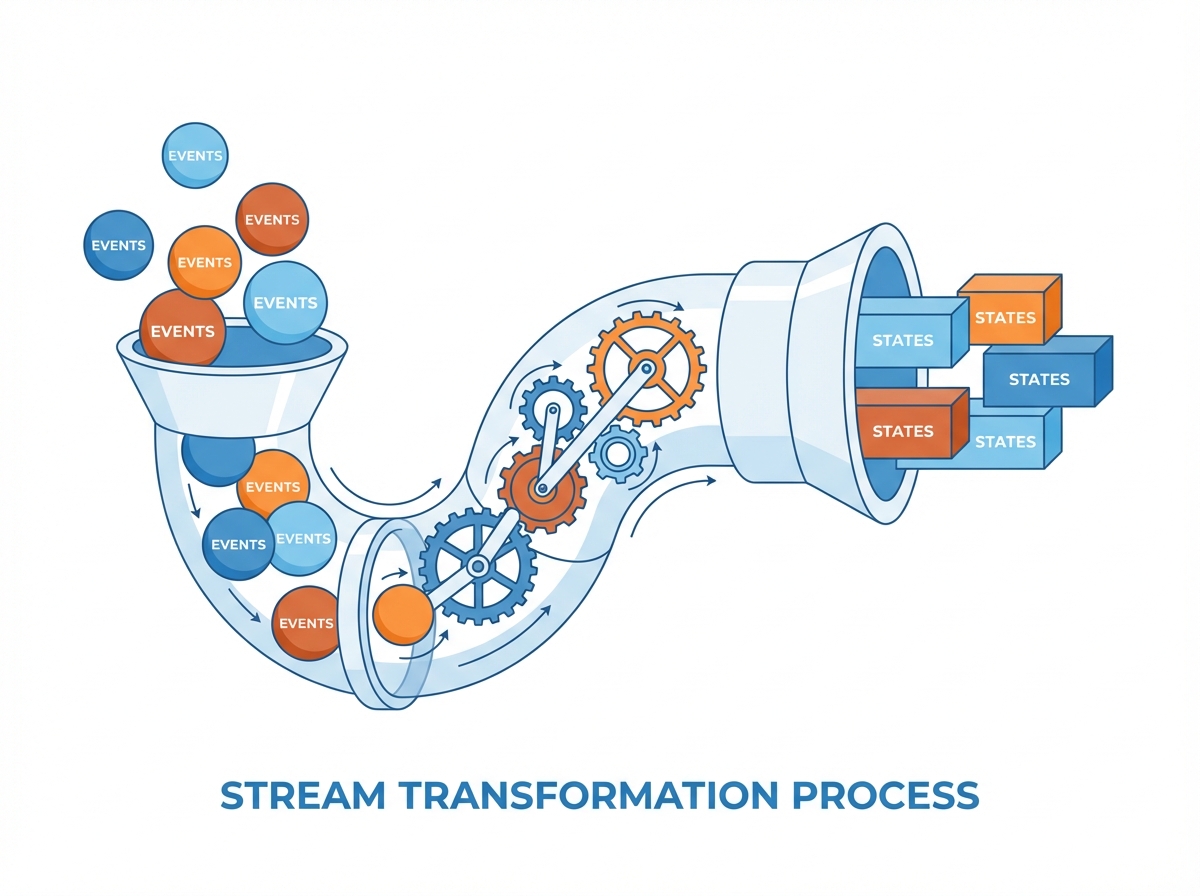
In the context of the flutter_bloc library, the complexity of managing StreamControllers, subscriptions, and memory leaks (closing streams) is abstracted away, allowing us to focus on the transitions:
// Conceptual Model of a BLoC
Stream<State> mapEventToState(Event event) async* {
  if (event is LoadData) {
    yield LoadingState();
    try {
      final data = await repository.fetch();
      yield LoadedState(data);
    } catch (e) {
      yield ErrorState(e.toString());
    }
  }
}
While the modern BLoC library uses on<Event> handlers rather than mapEventToState generators, the underlying reactive principle remains: State is a function of time and events.
Supercharging BLoC with Freezed: Immutable Unions
One of the biggest pain points in standard BLoC implementation is verbosity and lack of safety when handling states. If you implement states as standard Dart classes, you have to manually override == and hashCode to ensure that BLoC knows when a state has actually changed (value equality vs. referential equality). Furthermore, checking states with if (state is Loading) is brittle.
Enter Freezed. This code-generation package allows us to define “Sealed Classes” (Union Types). This gives us two massive advantages:
- Immutability out of the box.
- Pattern Matching (forcing us to handle every possible state).
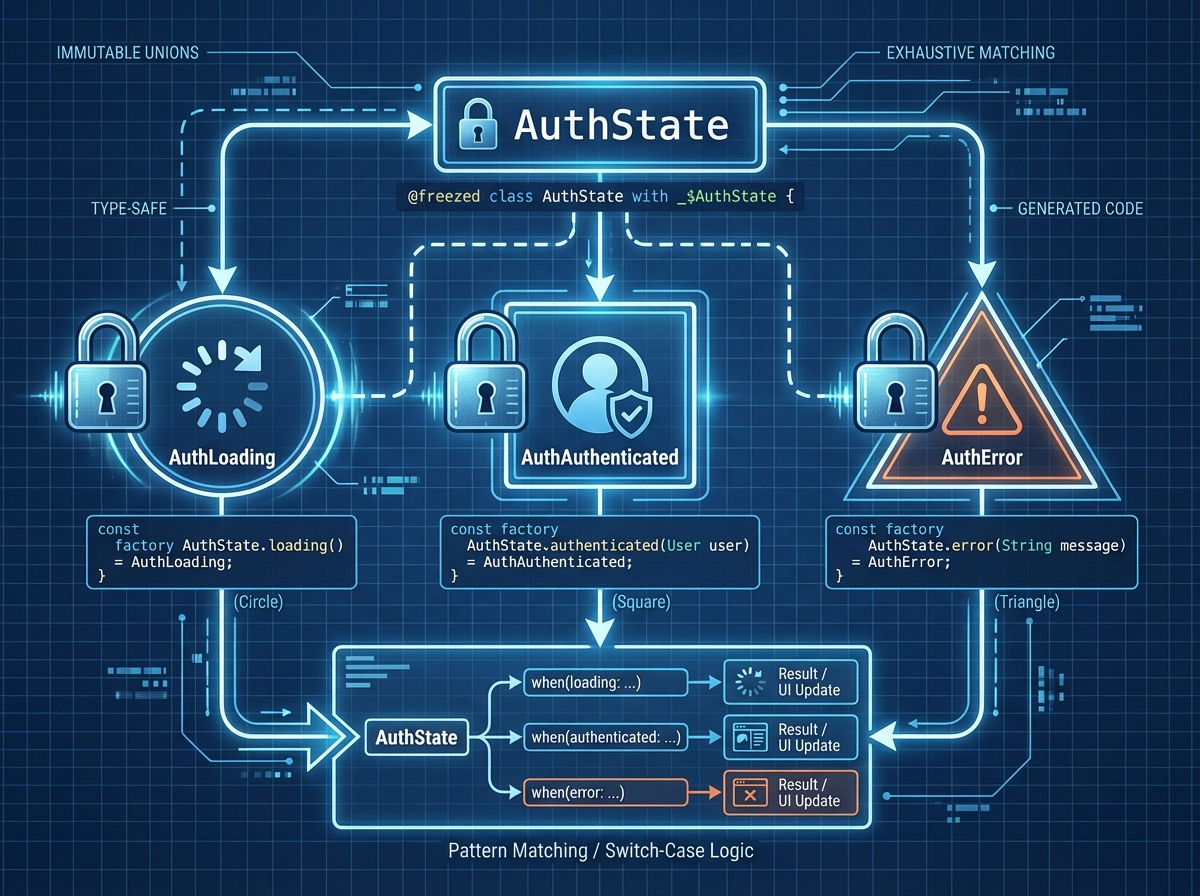
Let’s look at a real-world scenario: An OrderProcessing feature.
1. Defining Events and States with Freezed
import 'package:freezed_annotation/freezed_annotation.dart';

part 'order_bloc.freezed.dart';

// EVENTS: actions the user or system can take
@freezed
class OrderEvent with _$OrderEvent {
  const factory OrderEvent.started() = _Started;
  const factory OrderEvent.submitOrder({required String orderId, required double amount}) = _SubmitOrder;
  const factory OrderEvent.cancelOrder(String orderId) = _CancelOrder;
}

// STATES: The various snapshots of the UI
@freezed
class OrderState with _$OrderState {
  const factory OrderState.initial() = _Initial;
  const factory OrderState.processing() = _Processing;
  const factory OrderState.success(String confirmationCode) = _Success;
  const factory OrderState.failure(String error) = _Failure;
}
2. Implementing the Business Logic
Now we implement the BLoC. Notice how the logic is purely focused on data transformation. It doesn’t care if the UI is a button or a gesture detector.
import 'package:flutter_bloc/flutter_bloc.dart';

class OrderBloc extends Bloc<OrderEvent, OrderState> {
  final OrderRepository _repository;

  OrderBloc(this._repository) : super(const OrderState.initial()) {
    on<_SubmitOrder>(_onSubmitOrder);
    on<_CancelOrder>(_onCancelOrder);
  }

  Future<void> _onSubmitOrder(
    _SubmitOrder event,
    Emitter<OrderState> emit,
  ) async {
    // 1. Emit loading state
    emit(const OrderState.processing());

    try {
      // 2. Perform async business logic
      final result = await _repository.processOrder(event.orderId, event.amount);

      // 3. Emit success state with data
      emit(OrderState.success(result.confirmationCode));
    } catch (e) {
      // 4. Handle errors gracefully
      emit(OrderState.failure("Failed to process order: ${e.toString()}"));
    }
  }

  Future<void> _onCancelOrder(
    _CancelOrder event,
    Emitter<OrderState> emit,
  ) async {
    // Logic for cancellation...
  }
}
Because Freezed overrides == and hashCode, if you emit OrderState.processing() twice in a row, the BLoC library detects the values are identical and will not trigger a UI rebuild, optimizing performance automatically.
Dependency Injection: MultiBlocProvider and Scope
A BLoC needs dependencies (Repositories, API Clients). A Widget needs a BLoC. Connecting these cleanly is vital for a decoupled architecture.
The flutter_bloc package provides BlocProvider to inject a BLoC into the widget tree. Since providers rely on InheritedWidget under the hood, any child widget can access the BLoC instance via context.read<OrderBloc>().
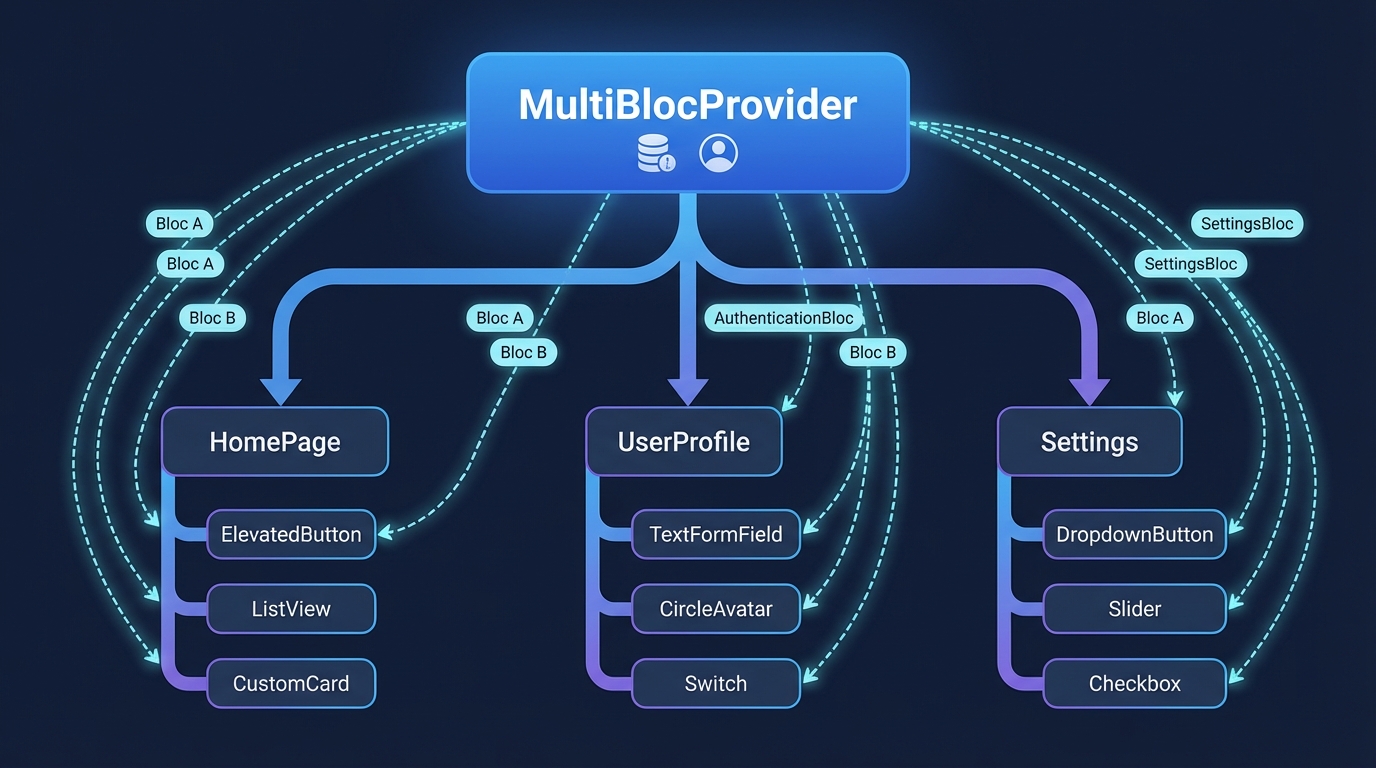
The Strategic Use of MultiBlocProvider
In complex apps, you often have global BLoCs (Authentication, Theme, Localization) and scoped BLoCs (OrderProcessing, Cart).
Do not create BLoCs globally. Create them as close to where they are needed as possible, but high enough to be shared by all widgets that need them.
void main() {
  runApp(
    // Inject Repositories first
    RepositoryProvider(
      create: (context) => OrderRepository(),
      child: const MyApp(),
    ),
  );
}

class MyApp extends StatelessWidget {
  const MyApp({super.key});

  @override
  Widget build(BuildContext context) {
    return MultiBlocProvider(
      providers: [
        // Global State: Authentication
        BlocProvider<AuthBloc>(
          create: (context) => AuthBloc()..add(const AuthEvent.appStarted()),
        ),
        // Feature State: Global Shopping Cart
        BlocProvider<CartBloc>(
          create: (context) => CartBloc(),
        ),
      ],
      child: MaterialApp(
        home: const HomeScreen(),
      ),
    );
  }
}
When navigating to a specific feature screen (e.g., Checkout), create the OrderBloc specifically for that route:
Navigator.of(context).push(
  MaterialPageRoute(
    builder: (context) => BlocProvider(
      create: (context) => OrderBloc(context.read<OrderRepository>()),
      child: const CheckoutScreen(),
    ),
  ),
);
This ensures that when CheckoutScreen is popped from the navigation stack, the OrderBloc is automatically closed (disposed), freeing up resources.
Handling Side Effects vs. UI Building
This is where 90% of developers get BLoC wrong.
The Problem: You want to show a SnackBar or navigate to a new screen when the state changes to Success.
The Mistake: Putting this logic inside the builder function of a BlocBuilder.
The builder function in BlocBuilder is strictly for returning a Widget. It may be called multiple times by the Flutter framework. Triggering navigation or showing alerts here creates unstable behavior and errors (e.g., “setState() or markNeedsBuild() called during build”).
The Solution: Listener vs. Builder
- BlocBuilder: Used only for rendering UI based on state.
- BlocListener: Used for side effects that happen once per state change (Navigation, Dialogs, Toasts).
- BlocConsumer: A helper that combines both.
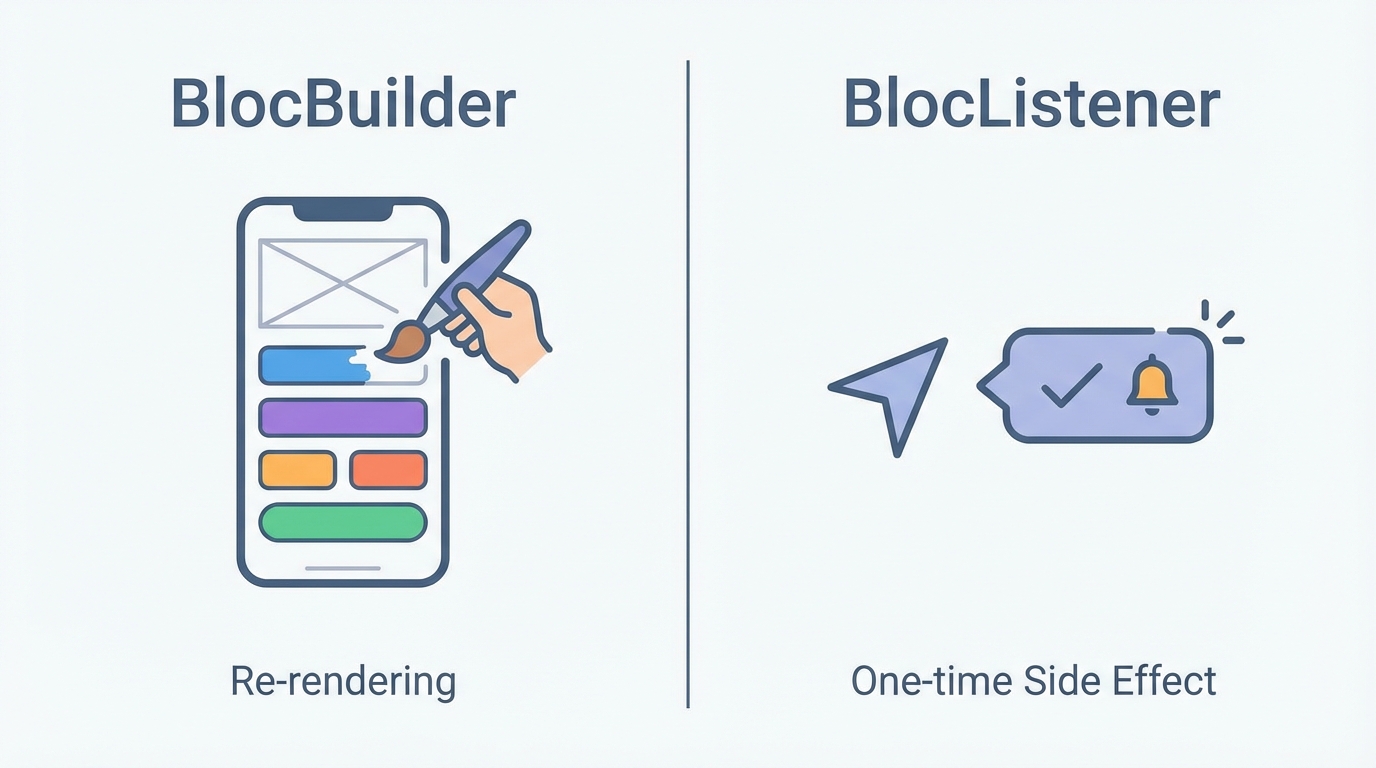
Here is the correct implementation using freezed pattern matching inside the UI:
class CheckoutView extends StatelessWidget {
  const CheckoutView({super.key});

  @override
  Widget build(BuildContext context) {
    return BlocConsumer<OrderBloc, OrderState>(
      // LISTEN: Handle Side Effects
      listener: (context, state) {
        state.whenOrNull(
          success: (confirmationCode) {
            ScaffoldMessenger.of(context).showSnackBar(
              SnackBar(content: Text('Order Placed! Code: $confirmationCode')),
            );
            Navigator.pop(context);
          },
          failure: (error) {
            ScaffoldMessenger.of(context).showSnackBar(
              SnackBar(content: Text(error), backgroundColor: Colors.red),
            );
          },
        );
      },
      // BUILD: Render UI
      builder: (context, state) {
        return state.maybeWhen(
          processing: () => const Center(child: CircularProgressIndicator()),
          orElse: () => Column(
            children: [
              const Text("Review your order"),
              ElevatedButton(
                onPressed: () {
                  context.read<OrderBloc>().add(
                    const OrderEvent.submitOrder(orderId: '123', amount: 99.99)
                  );
                },
                child: const Text("Pay Now"),
              )
            ],
          ),
        );
      },
    );
  }
}
Notice the use of state.whenOrNull and state.maybeWhen. These are generated by Freezed.
listener: We only care about Success and Failure.builder: We show a spinner for Processing, and the form for everything else.
Testing: The Ultimate Benefit of BLoC
If you write logic inside a UI Widget (StatefulWidget), testing it requires widget_test, which is slower and requires mocking the Flutter engine context.
With BLoC, your business logic is pure Dart code. You can test it in complete isolation using the bloc_test package. This is unit testing on steroids.
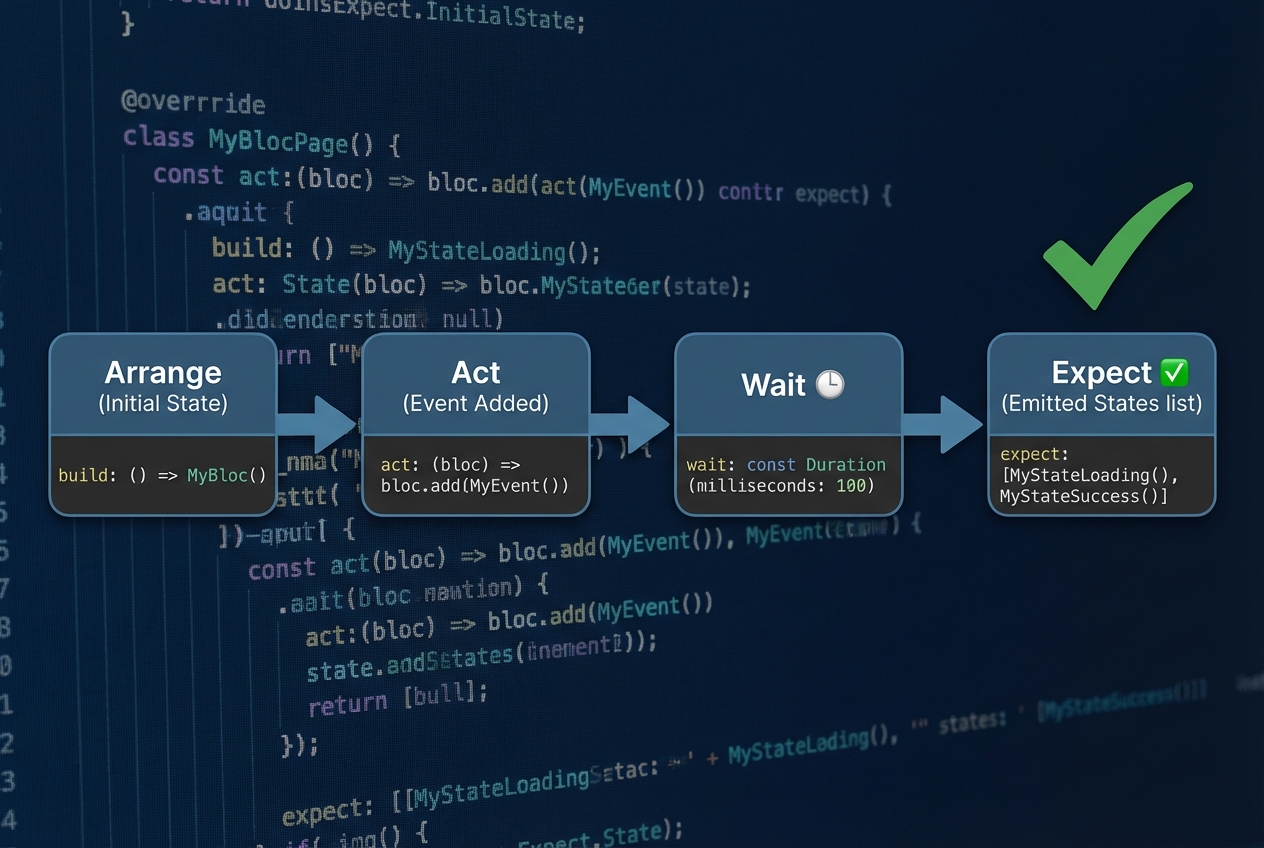
Writing the Test
We define the “Scenario,” the “Act” (event added), and the “Expectation” (sequence of states).
import 'package:bloc_test/bloc_test.dart';
import 'package:flutter_test/flutter_test.dart';
import 'package:mocktail/mocktail.dart';

// Mock the dependency
class MockOrderRepository extends Mock implements OrderRepository {}

void main() {
  late OrderBloc orderBloc;
  late MockOrderRepository mockRepo;

  setUp(() {
    mockRepo = MockOrderRepository();
    orderBloc = OrderBloc(mockRepo);
  });

  tearDown(() {
    orderBloc.close();
  });

  group('OrderBloc', () {
    final tOrderId = '123';
    final tAmount = 50.0;
    final tCode = 'CONFIRM-ABC';

    test('initial state is OrderState.initial', () {
      expect(orderBloc.state, const OrderState.initial());
    });

    blocTest<OrderBloc, OrderState>(
      'emits [processing, success] when SubmitOrder is successful',
      build: () {
        // Arrange
        when(() => mockRepo.processOrder(tOrderId, tAmount))
            .thenAnswer((_) async => OrderResult(tCode));
        return orderBloc;
      },
      act: (bloc) => bloc.add(OrderEvent.submitOrder(orderId: tOrderId, amount: tAmount)),
      expect: () => [
        const OrderState.processing(),
        OrderState.success(tCode),
      ],
      verify: (_) {
        verify(() => mockRepo.processOrder(tOrderId, tAmount)).called(1);
      },
    );

    blocTest<OrderBloc, OrderState>(
      'emits [processing, failure] when SubmitOrder throws',
      build: () {
        when(() => mockRepo.processOrder(any(), any()))
            .thenThrow(Exception('Payment Declined'));
        return orderBloc;
      },
      act: (bloc) => bloc.add(OrderEvent.submitOrder(orderId: tOrderId, amount: tAmount)),
      expect: () => [
        const OrderState.processing(),
        const OrderState.failure("Failed to process order: Exception: Payment Declined"),
      ],
    );
  });
}
This test suite gives you 100% confidence that your business logic works correctly before you even draw a single pixel on the screen.
Advanced Techniques: Event Transformers
For Senior Engineers, BLoC offers powerful control over how events are processed using EventTransformer.
Imagine a Search Bar. Users type quickly. You don’t want to hit your API on every keystroke. In an imperative world, you’d manually manage a Timer. In BLoC, you just use a reactive operator: debounce.
import 'package:rxdart/rxdart.dart';

EventTransformer<T> debounce<T>(Duration duration) {
  return (events, mapper) => events.debounceTime(duration).flatMap(mapper);
}

class SearchBloc extends Bloc<SearchEvent, SearchState> {
  SearchBloc(this._api) : super(SearchInitial()) {
    on<SearchTextChanged>(
      _onTextChanged,
      // Apply the transformer
      transformer: debounce(const Duration(milliseconds: 300)),
    );
  }

  Future<void> _onTextChanged(SearchTextChanged event, Emitter<SearchState> emit) async {
    // This logic only runs if the user stops typing for 300ms
    final results = await _api.search(event.query);
    emit(SearchSuccess(results));
  }
}
This elegant integration of rxdart with BLoC transforms a complex concurrency problem into a single line of configuration.
Conclusion
Reactive Architecture with BLoC is not just a library choice; it is a commitment to quality. By strictly separating UI from Logic, implementing immutable state with Freezed, and adhering to the Input/Output stream contract, you create applications that are:
- Scalable: New features can be added as new BLoCs without breaking existing ones.
- Testable: Logic is verified in isolation.
- Predictable: Unidirectional flow makes debugging state changes trivial.
While the boilerplate may seem higher initially compared to setState or ChangeNotifier, the payoff in maintainability for long-term projects is exponential. In the world of Flutter development, BLoC is the bedrock of professional engineering.