How I built an AI blogger Agent using N8N and Jekyll

As engineers, we often suffer from the “cobbler’s children” syndrome. We build complex, scalable systems for clients and employers, yet our own personal portfolios and blogs gather dust. The friction of context-switching from coding to writing, finding assets, and managing deployments often kills the momentum before a post is even drafted.
I decided to solve this not by “writing more,” but by engineering a solution. I built an autonomous AI Agent capable of end-to-end technical blogging. This isn’t a simple “text-generation” script; it is a full-stack automated pipeline that orchestrates visual planning, asset generation, content synthesis, version control, and continuous deployment.
This post creates a deep-dive analysis of the architecture, the specific n8n workflows used to manage the backend logic, and the Jekyll frontend that serves the content.
The Architecture: A Bird’s Eye View
The system is designed as a decoupled pipeline. The “Brain” (backend) is an n8n instance that orchestrates logic, while the “Face” (frontend) is a static Jekyll site hosted on Railway. The bridge between them is GitHub.
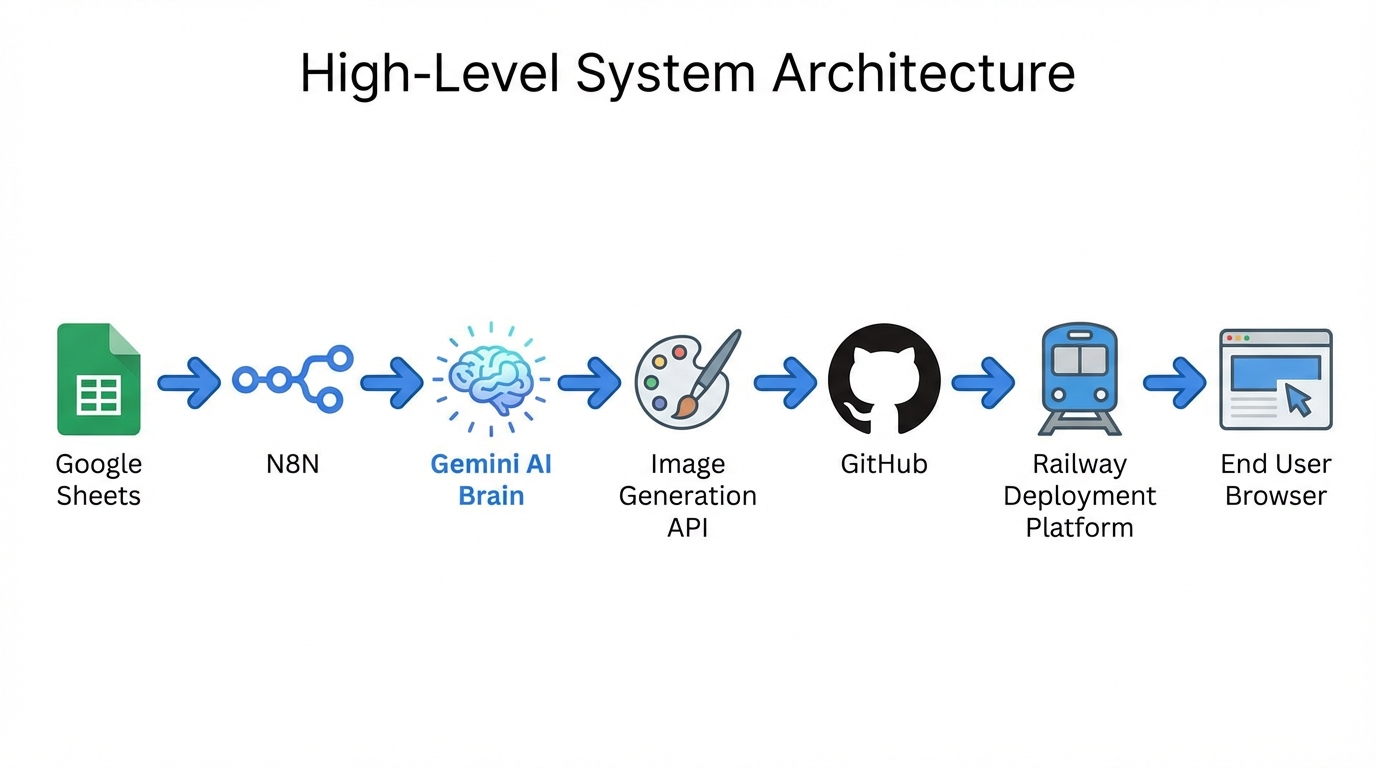
The flow operates on a “Push” model:
- Trigger: A Google Sheet acts as the editorial calendar.
- Orchestration (n8n): Handles the logic, API calls, and state management.
- Intelligence (Gemini): Provides the reasoning, visual planning, and content writing.
- Storage (GitHub): Acts as the CMS (Content Management System) for both Markdown and binary assets.
- Build & Deploy (Railway): Detects changes in the repository and builds the static site.
This architecture was chosen for resilience and cost-efficiency. By using Git as the source of truth, we eliminate the need for a traditional database, and by using n8n, we can visually debug the complex chain of asynchronous operations required to generate a rich media post.
Part 1: The Backend Workflow (n8n)
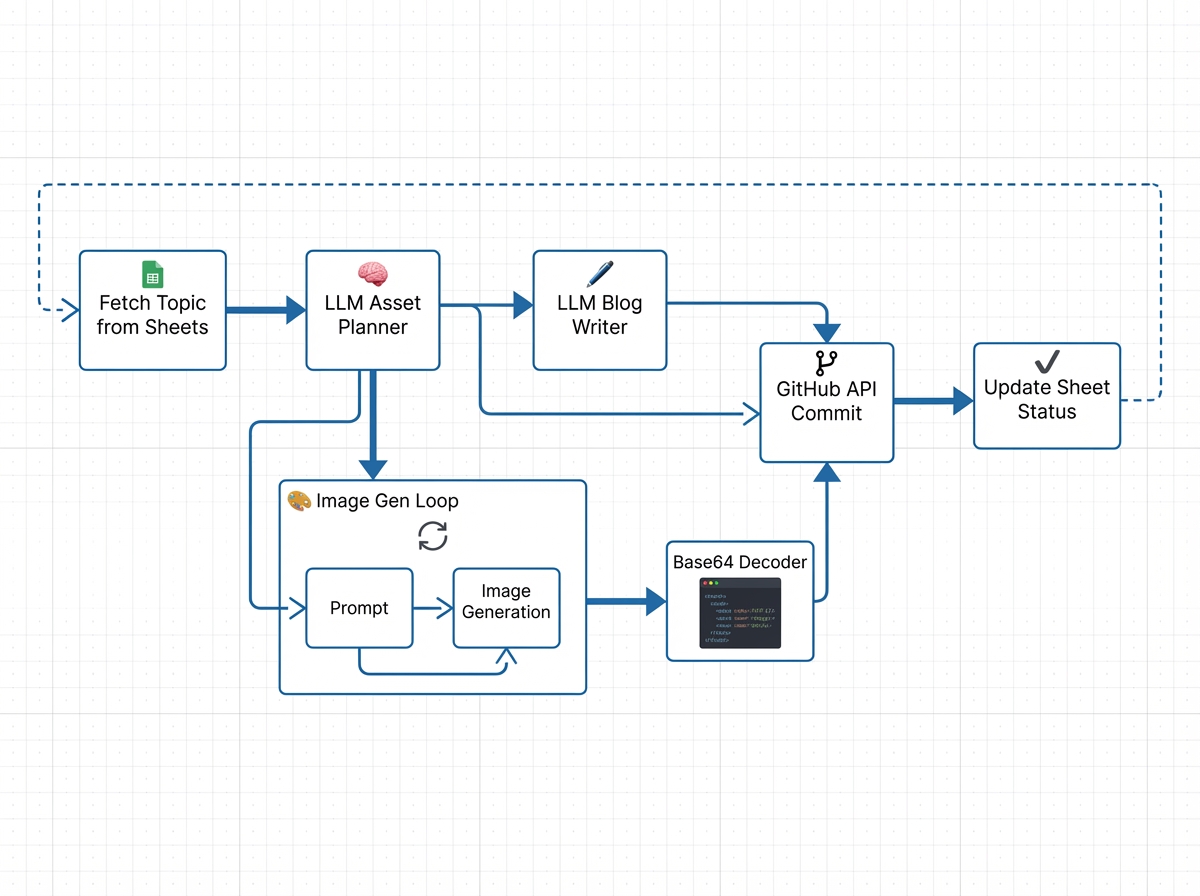
The core of this system is a complex n8n workflow. It doesn’t just “ask for an article.” It mimics the cognitive process of a human technical writer: Plan visuals first, create assets, then write the text around those assets.
1. The Trigger and State Management
The workflow begins by polling a Google Sheet. While webhooks are faster, polling offers better rate-limit control when dealing with LLMs.
The Filter Logic:
We fetch all rows but process only one where Status == "Pending". This acts as a semaphore, preventing the agent from trying to write the entire backlog simultaneously.
// n8n Function Item Node: Filter for next assignment
const rows = items[0].json.rows;
const pendingTask = rows.find(row => row.status === 'Pending');

if (!pendingTask) {
  return []; // Stop workflow if nothing to do
}

return [{ json: pendingTask }];
2. The Visual Strategist (Gemini)
Before writing a single word, the workflow invokes Google’s Gemini LLM. The prompt here is crucial. We don’t ask for the blog post yet. We ask for a Visual Asset Plan.
Prompt Engineering:
“You are a technical editor. Based on the topic ‘${topic}’, create a plan for 4 visual assets. For each asset, define the ‘Type’ (chart, diagram, hero) and a detailed ‘Image Generation Prompt’.”
Gemini returns a structured JSON array. This is critical because we need to generate these images before the final writing phase so that we can embed their permanent URLs into the Markdown.
3. Image Generation and GitHub Commits
This is the most technically demanding part of the workflow. We iterate over the JSON plan provided by Gemini. For each item, we call an Image Generation API (e.g., OpenAI DALL-E 3 or Stable Diffusion via API).
The challenge lies in handling the binary data.
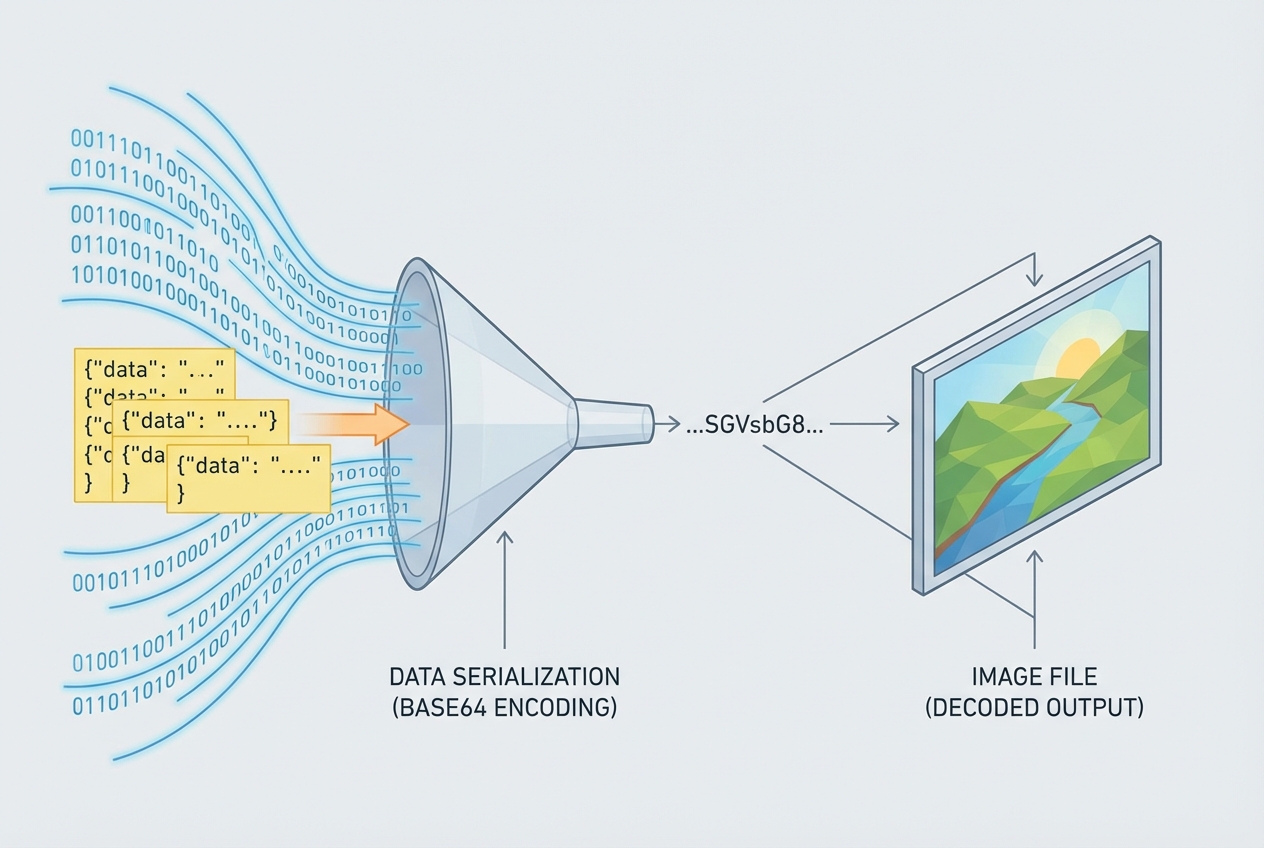
The API returns a URL or Base64 string. To host this on our own domain (to avoid hotlinking or expiring URLs), we must upload it to GitHub.
The Base64 Challenge: The GitHub API requires file content to be Base64 encoded. In n8n, handling binary buffers requires specific node configurations.
- HTTP Request: Download image as Binary.
- Code Node: Convert Binary Buffer to Base64 string.
// n8n Code Node: Buffer to Base64 for GitHub API
const binaryData = items[0].binary.data; // The image from previous node
const buffer = Buffer.from(binaryData.data, 'base64'); // n8n stores internal binary as base64 already, but let's ensure context

// GitHub requires standard Base64
const content = buffer.toString('base64');

return {
  json: {
    filename: `assets/images/${generated_slug}-${timestamp}.png`,
    content: content,
    message: `chore: add auto-generated asset for ${topic}`
  }
};
The GitHub Commit:
We then fire a PUT request to https://api.github.com/repos/{owner}/{repo}/contents/{path}.
Success here returns the download_url. We collect these URLs into an array to pass to the next stage.
4. Contextual Content Generation
Now, we have a list of live image URLs. We feed these back into Gemini for the final writing phase.

The “Deep-Dive” Prompt:
“Write a technical blog post about ‘${topic}’. Here are the URLs for the images you planned earlier: ${image_url_list}. You MUST embed these images in the Markdown where they contextually fit. Do not simply append them at the end. Use the syntax
.”
This ensures that the diagrams appear exactly where the text explains them, mimicking a human author’s layout.
5. The Final Commit (Markdown)
Finally, the generated Markdown is cleaned (removing Markdown code block fences usually returned by LLMs) and committed to the _posts/ directory.
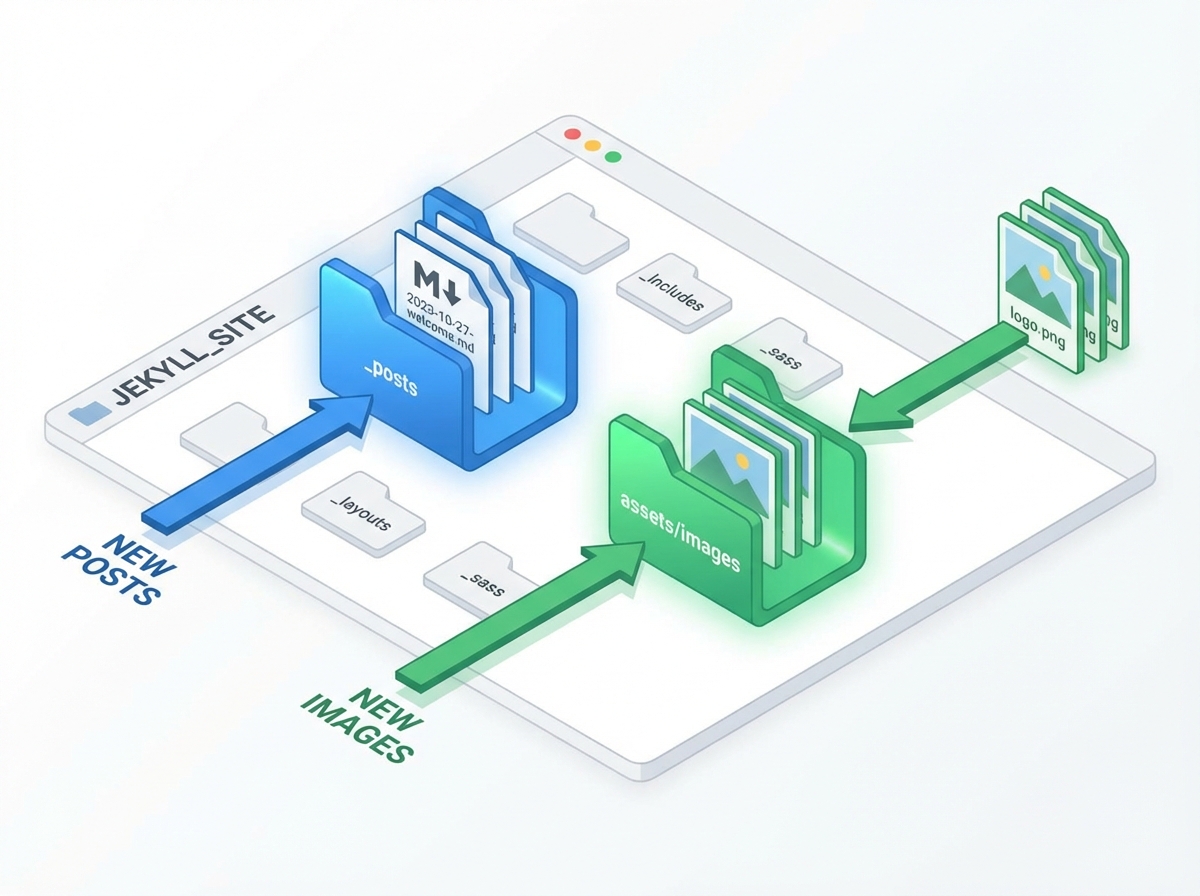
The filename format is strict: YYYY-MM-DD-title-slug.md. This is required for Jekyll to parse the date correctly.
// Filename generation logic
const date = new Date().toISOString().split('T')[0];
const slug = title.toLowerCase().replace(/[^a-z0-9]+/g, '-').replace(/(^-|-$)+/g, '');
const filename = `_posts/${date}-${slug}.md`;
Part 2: The Frontend (Jekyll on Railway)
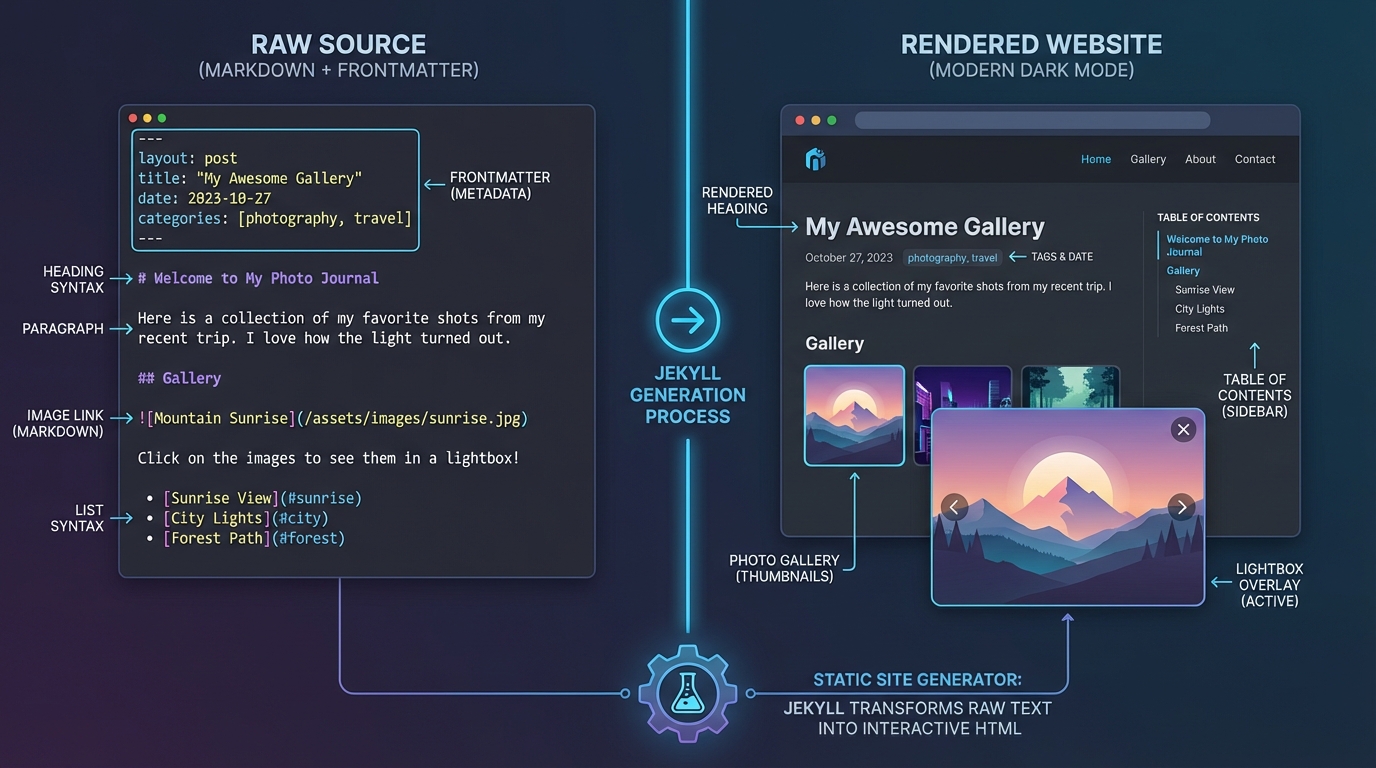
While the backend is the brain, the frontend is the experience. I chose Jekyll because it transforms the filesystem into a website. There is no database to hack, no CMS to update, and the “API” is just the Git repository.
Deployment Pipeline
I use Railway for hosting. Railway has a robust integration with GitHub.
- n8n commits a new
.mdfile to_posts. - GitHub triggers a webhook to Railway.
- Railway pulls the repo.
- Railway runs
bundle exec jekyll build. - The
_sitedirectory is served via Nginx.
This entire process takes about 45 seconds from the moment n8n finishes to the post being live.
Custom Frontend Features (Vanilla JS)
A standard Jekyll theme wasn’t enough. I wanted a “Medium-like” experience but without the paywall and tracking. I implemented several features using raw JavaScript to keep the site lightweight.
1. Image Lightbox
Since the AI generates detailed diagrams, users need to zoom in. I wrote a script that wraps every post image in a modal trigger.
document.addEventListener('DOMContentLoaded', () => {
  const images = document.querySelectorAll('.post-content img');
  const lightbox = document.getElementById('lightbox');
  const lightboxImg = document.getElementById('lightbox-img');

  images.forEach(img => {
    img.style.cursor = 'zoom-in';
    img.addEventListener('click', () => {
      lightboxImg.src = img.src;
      lightbox.classList.add('active');
    });
  });

  lightbox.addEventListener('click', (e) => {
    if (e.target !== lightboxImg) {
      lightbox.classList.remove('active');
    }
  });
});
2. Multi-Tag Filtering
Jekyll handles categories natively, but real-time filtering usually requires a page reload. I implemented a client-side filter. I serialize all post metadata into a JSON object in the DOM, allowing instant filtering.
_layouts/home.html:
<script>
  window.posts = [

      {
        "title": "Top 5 Programming Languages to learn in 2026",
        "url": "/deep-dive/career-growth/software-engineering/system-design/tech-trends/2025/12/31/top-5-programming-languages-to-learn-in-2026.html",
        "tags": ["deep-dive","career-growth","software-engineering","system-design","tech-trends"]
      },

      {
        "title": "Relational Database Management System: An Engineering Deep-Dive",
        "url": "/deep-dive/database-systems/sql/data-modeling/backend-engineering/2025/12/30/relational-database-management-system.html",
        "tags": ["deep-dive","database-systems","sql","data-modeling","backend-engineering"]
      },

      {
        "title": "Textbook for Excel Exam",
        "url": "/deep-dive/excel-mastery/data-analysis/spreadsheet-engineering/certification/2025/12/29/textbook-for-excel-exam.html",
        "tags": ["deep-dive","excel-mastery","data-analysis","spreadsheet-engineering","certification"]
      },

      {
        "title": "Reactive Architecture in Flutter: Mastering BLoC for Scalable State Management",
        "url": "/deep-dive/flutter/state-management/bloc/reactive-architecture/2025/12/18/reactive-architecture-in-flutter-mastering-bloc-for-scalable-state-management.html",
        "tags": ["deep-dive","flutter","state-management","bloc","reactive-architecture"]
      },

      {
        "title": "Implementing Agentic Workflows for Java-to-Node.js Migration",
        "url": "/deep-dive/generative-ai/legacy-migration/java-spring/nodejs-nestjs/2025/12/18/implementing-agentic-workflows-for-javatonodejs-migration.html",
        "tags": ["deep-dive","generative-ai","legacy-migration","java-spring","nodejs-nestjs"]
      },

      {
        "title": "How I built an AI blogger Agent using N8N,Github and Jekyll",
        "url": "/deep-dive/n8n/ai-automation/jekyll/system-design/2025/12/18/how-i-built-an-ai-blogger-agent-using-n8ngithub-and-jekyll.html",
        "tags": ["deep-dive","n8n","ai-automation","jekyll","system-design"]
      },

      {
        "title": "How I built an AI blogger Agent using N8N and Jekyll",
        "url": "/deep-dive/n8n/generative-ai/jekyll/automation/2025/12/18/how-i-built-an-ai-blogger-agent-using-n8n-and-jekyll.html",
        "tags": ["deep-dive","n8n","generative-ai","jekyll","automation"]
      },

      {
        "title": "Mastering Razorpay Webhooks: Architecting an Idempotent, Event-Driven Ingestion Engine",
        "url": "/deep-dive/system-design/payments/event-driven-architecture/razorpay/2025/12/17/mastering-razorpay-webhooks-architecting-an-idempotent-eventdriven-ingestion-engine.html",
        "tags": ["deep-dive","system-design","payments","event-driven-architecture","razorpay"]
      },

      {
        "title": "Java Concurrency at Scale: Migrating from Thread Pools to Virtual Threads",
        "url": "/deep-dive/java/concurrency/virtual-threads/software-architecture/2025/12/17/java-concurrency-at-scale-migrating-from-thread-pools-to-virtual-threads.html",
        "tags": ["deep-dive","java","concurrency","virtual-threads","software-architecture"]
      },

      {
        "title": "Escaping the if (isAdmin) Trap: Implementing Scalable RBAC and ABAC in Node.js",
        "url": "/deep-dive/nodejs/security/rbac/abac/system-design/2025/12/17/escaping-the-if-isadmin-trap-implementing-scalable-rbac-and-abac-in-nodejs.html",
        "tags": ["deep-dive","nodejs","security","rbac","abac","system-design"]
      },

      {
        "title": "Building a Virtual Data Analyst: Architecting Agentic AI Workflows over Power BI",
        "url": "/deep-dive/gen-ai/power-bi/agentic-workflows/python/2025/12/17/building-a-virtual-data-analyst-architecting-agentic-ai-workflows-over-power-bi.html",
        "tags": ["deep-dive","gen-ai","power-bi","agentic-workflows","python"]
      },

      {
        "title": "Beyond the Happy Path: Architecting Fault-Tolerant Recurring Payments with Razorpay",
        "url": "/technical/deep-dive/2025/12/17/beyond-the-happy-path-architecting-faulttolerant-recurring-payments-with-razorpay.html",
        "tags": ["technical","deep-dive"]
      },

      {
        "title": "Beyond GET and SET: Architecting Resilient Distributed Caching Patterns for Microservices",
        "url": "/deep-dive/system-design/redis/distributed-systems/microservices/2025/12/17/beyond-get-and-set-architecting-resilient-distributed-caching-patterns-for-microservices.html",
        "tags": ["deep-dive","system-design","redis","distributed-systems","microservices"]
      },

  ];
</script>
The Javascript then simply toggles display: none on the post cards based on the selected tag array.
3. Dark Mode with Persistence
Dark mode is implemented via CSS variables and localStorage. This prevents the “flash of white content” (FOUC) by checking storage in the <head> before the body renders.
:root {
  --bg-color: #ffffff;
  --text-color: #1a1a1a;
}

[data-theme="dark"] {
  --bg-color: #0f172a;
  --text-color: #e2e8f0;
}

body {
  background-color: var(--bg-color);
  color: var(--text-color);
  transition: background-color 0.3s ease;
}
Advanced Scenarios & Trade-offs
Building an autonomous agent isn’t without its edge cases. Here are the production issues I encountered and how I solved them.
1. Hallucinations and JSON Validity
When asking an LLM for a JSON plan (visual assets), it sometimes wraps the JSON in markdown code blocks (```json … ```) or adds conversational text.
Solution: In n8n, I use a “Function Item” node specifically to sanitize the LLM output before parsing it.
// Regex to extract pure JSON
const jsonMatch = items[0].json.content.match(/\{[\s\S]*\}/);
if (jsonMatch) {
    return { json: JSON.parse(jsonMatch[0]) };
}
throw new Error("LLM failed to return valid JSON");
2. GitHub API Race Conditions
If the agent tries to upload 4 images simultaneously (parallel execution in n8n), GitHub might reject requests if the git tree updates haven’t propagated instantly, or we might hit rate limits.
Solution: I configured the n8n “Split In Batches” node to size 1. This forces sequential uploads. It’s slower, but significantly more reliable. It also simplifies the logic of aggregating the resulting URLs.
3. Context Window Limits
Passing high-res base64 strings back to an LLM context is expensive and often exceeds token limits.
Solution: This is why the architecture uploads to GitHub first. We pass the URL (string), not the image data, to the writing agent. This keeps the token count low while allowing the LLM to know exactly what asset it is referencing.
Conclusion
This project demonstrates that we have crossed a threshold in Generative AI. We are no longer limited to “chatbots” that answer questions. We can build Agents—systems that plan, execute, use tools (APIs), and persist their work.
By combining the low-code orchestration of n8n with the raw power of Gemini and the stability of Jekyll, I’ve created a blogging engine that doesn’t just save time—it enforces a level of visual and structural consistency that is hard to maintain manually.
The next step for this agent is Self-Correction. I plan to implement a feedback loop where the agent reads the build logs from Railway. If a build fails (e.g., due to bad Liquid syntax), the agent will trigger a “Fix It” workflow to patch the markdown file automatically.
The future of content isn’t just AI-generated; it’s AI-architected.
Note: All diagrams in this post were planned and generated by the agent itself as part of the workflow described above.